When Trust Stops Being an Assumption and Becomes an Intelligent Decision
Zero Trust Azure
Zero Trust: When Trust Stops Being an Assumption and Becomes an Intelligent Decision 🔐
In a world where there is no longer a clear “inside” or “outside” the network, and employees, apps, and data live everywhere, a new security philosophy emerged and reshaped everything: Zero Trust Architecture.
The idea is simple, yet revolutionary:
Never trust. Always verify. Every time.
Why Zero Trust, and Why Now?
Traditional security models assumed that anything inside the corporate network was safe.
Today, that assumption no longer holds:
- Employees work from anywhere 🌍
- SaaS applications dominate the landscape ☁️
- Data moves faster than ever 📊
- Attacks are more sophisticated and persistent 🧠
This is where legacy security fails — and Zero Trust begins.
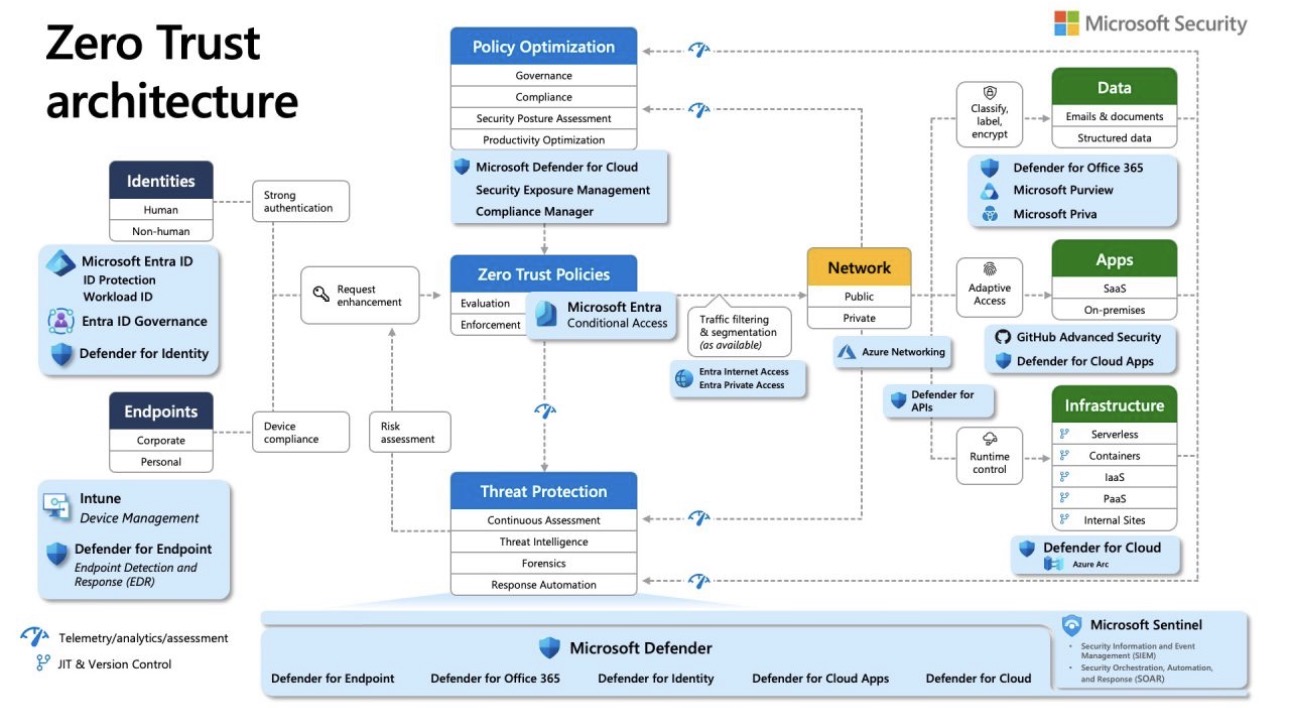
The Six Pillars of Zero Trust (as shown in the architecture)
1️⃣ Identities – The New Security Perimeter
Identity is now the primary control plane.
Whether it’s:
- A human user
- Or a non-human identity (service, workload)
🔹 With Microsoft Entra ID:
- Strong authentication (MFA)
- Identity protection
- Access governance
- Threat detection tied to identities
Rule: No access without identity verification and context.
2️⃣ Endpoints – Is the Device Trustworthy?
Not every device deserves access.
Zero Trust continuously evaluates:
- Is the device managed?
- Is it compliant?
- Is it secure?
🔹 Enabled by:
- Microsoft Intune for device management
- Microsoft Defender for Endpoint (EDR) for detection and response
Non-compliant device = restricted or denied access ❌
3️⃣ Intelligent Policies – Conditional Access
This is where real-time decisions happen ✨
Microsoft Entra Conditional Access evaluates:
- Who you are
- Where you’re connecting from
- The device you’re using
- Current risk level
Then enforces:
- Allow
- Step-up authentication
- Block
Access is not static — it’s a dynamic, risk-based decision.
4️⃣ Network – Segmentation Over Blind Trust
Zero Trust eliminates flat, trusted networks.
Instead, it enforces:
- Traffic filtering
- Network segmentation
- Application-level access (not traditional VPNs)
🔹 Powered by:
- Entra Internet Access
- Entra Private Access
- Azure Networking
Even if you get in, you only see what you’re allowed to see 👁️
5️⃣ Data & Applications – Protect What Truly Matters
Data is the ultimate target 🎯
🔹 Protection across:
- Microsoft Purview: data classification, labeling, encryption
- Defender for Office 365: email and document security
- Defender for Cloud Apps: SaaS visibility and control
- GitHub Advanced Security: application security
Access control alone is not enough — data must protect itself.
6️⃣ Infrastructure – Security from Cloud to Datacenter
Across:
- IaaS
- PaaS
- Containers
- Serverless workloads
🔹 With Microsoft Defender for Cloud and Azure Arc:
- Unified visibility
- Runtime protection
- Continuous security posture assessment
Security is not a one-time deployment — it’s continuous.
The Central Nervous System: Detection & Response 🧠
At the core of Zero Trust:
- Microsoft Sentinel (SIEM + SOAR)
- Microsoft Defender suite
🔹 Centralized telemetry
🔹 Advanced analytics
🔹 Automated incident response
From detection to containment — in minutes, not days.
Final Thoughts
Zero Trust is not a product.
It’s not even a single technology.
It’s a security mindset
- Never assume trust
- Continuously assess risk
- Apply least-privilege access
- Monitor everything, all the time
In the era of cloud, hybrid work, and advanced threats,